Well I don't even remember what day it is.. Will calculate that and get back to the habit of updating the work log more often. Over the last couple of months we have done major story development, submitted and presented the proposal, got some feedback and have extended our team a bit. It's been a bit slow, but I would say it has been intentional. I think with all the paperwork out of the way, I can now get back into actually DOING things. For the next couple of months, I am concentrating all my energies towards the FX TD responsibilities I have. I am starting out with basic Houdini work and as time progresses I will get to more advanced development.
Sunday, October 14, 2012

Wednesday, July 11, 2012
Day 31-42
Hello!!
Weird things happen. I got up last week with pain in my jaw. Went to the doctor and I seem to have dislocated it in my sleep somehow. So have been on painkillers and sleeping for 12-14 hours a day. AND that would explain me not updating my work log.


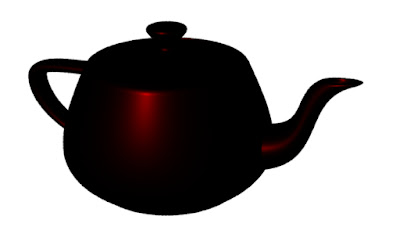
However, the constant shader is not very useful as it doesn't give us any clue about the 3D shape of the object being rendered. So then I moved on to development of a Diffuse shader. This shader takes into account the diffuse reflections and calculated the amount of light being reflected based on the normals of the surface.
Ci = Cs * diffuse(Nf) * Oi
The shader has been applied to a sphere and a teapot.


This shader, is very close to the renderMan Matte shader except for that it doesn't take into account the ambient reflections. We can simply add the ambient reflections by modifying the Ci in this way:
Ci = Oi * Cs * (Ka * ambient() + Kd * diffuse(Nf))


As we can now compare, the objects react better to the ambient light in the scene.
I also went on to develop a metal and a plastic shader based on the metal and plastic materials that are built in renderMan. Here is the output for that:



Once I was done with developing all the basic shaders I started developing some textures. Here I have developed a vertical ramp, horizontal ramp in black and white and then I added some colour into it and the ramp interpolates automatically form black to purple. The output for the operation is here:
Weird things happen. I got up last week with pain in my jaw. Went to the doctor and I seem to have dislocated it in my sleep somehow. So have been on painkillers and sleeping for 12-14 hours a day. AND that would explain me not updating my work log.
Now I am slowly trying to get to work whenever I get out of my drug induced sleep :p
I have started with starting shader development. Have been reading a bit of RSL and experimenting with very basic shaders. Still VERY groggy..
I have started with starting shader development. Have been reading a bit of RSL and experimenting with very basic shaders. Still VERY groggy..
 |
| Utah Teapot with hsv ramp shader |
Here I developed a shader that gives a ramp based on hsv values and applied it to the Utah teapot. Ofcourse I don't yet know how to get the projections right, so everything is a bit messed up. The shader can be seen on a plane in the image below.
 |
| hsv ramp shader applied on a plane |
And here I have applied it on a sphere. It can be seen that the shading is a regular plastic variety and as a texture we have a hsv ramp. I used
Ct = color "hsv" (s,t,1);
to get this effect.
 The shader applied to a sphere with plastic shader The shader applied to a sphere with plastic shader |
I started with developing simpler shaders and understanding how the renderMan shaders are actually written. So I built up the renderMan constant shader and applied it to a sphere and a teapot. Nothing special going on here, we just premultiply the opacity with the input colour and assign the value obtaied to Ci:
Ci = Oi * Cs
However, the constant shader is not very useful as it doesn't give us any clue about the 3D shape of the object being rendered. So then I moved on to development of a Diffuse shader. This shader takes into account the diffuse reflections and calculated the amount of light being reflected based on the normals of the surface.
Ci = Cs * diffuse(Nf) * Oi
The shader has been applied to a sphere and a teapot.
This shader, is very close to the renderMan Matte shader except for that it doesn't take into account the ambient reflections. We can simply add the ambient reflections by modifying the Ci in this way:
Ci = Oi * Cs * (Ka * ambient() + Kd * diffuse(Nf))
As we can now compare, the objects react better to the ambient light in the scene.
I also went on to develop a metal and a plastic shader based on the metal and plastic materials that are built in renderMan. Here is the output for that:
Once I was done with developing all the basic shaders I started developing some textures. Here I have developed a vertical ramp, horizontal ramp in black and white and then I added some colour into it and the ramp interpolates automatically form black to purple. The output for the operation is here:
 |
| A horizontal ramp |
 |
| A vertical ramp |
 |
| A horizontal coloured ramp |
Friday, June 29, 2012
Day 30 and 31
Taking a 2 day break from work to help out my dad's company. They have a major product launch lined up and I need to help them out with some designs.
Day 27-29
Sorry about not posting anything for the last 4 days. I got lost in the world of RSL(renderMan Shading Language). Its taking some time to get the first outputs, so hang on.
Tuesday, June 26, 2012
Day 26
So I have finally reached the end of the second section of Ian's book, that was taking about geometry handling in renderMan. I covered Depth of Field today and for the rest of the day, I will try to go through the C API of renderMan and Hair and Particles. Here I am just discussing Depth of Field as I understand it.
RenderMan gives an amazing amount of control on the Depth of Field. The command takes 3 parameters:

A thing to keep in mind, when using any kind of blur, is that we need to increase pixel samples. The two images below show a comparison with default pixel samples and 8 samples.
f-stop
Well thats about it for now. I might make another post today with C API results.
 |
| Depth of Field with a 270 mm lens |
- Focal Distance
- Focal Length
- F-stop
Focal Distance
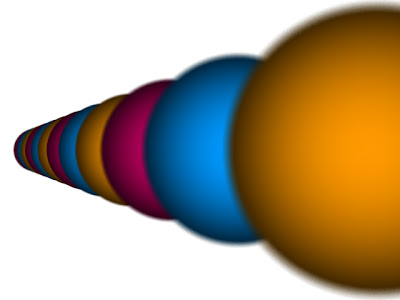
Focal Distance tells the renderer the distance from the camera at which the objects are in perfect focus. Objects closer than or farther than this distance appear blurred. Changing the focal distance and animating it can give a rake-focus kind of an effect.
As can be noticed in the picture above, on the left, the focus is on the 3rd sphere and on the left, the focus is on the 7th or 8th sphere. Also, the amount of blur on the first sphere is different.
Focal Length
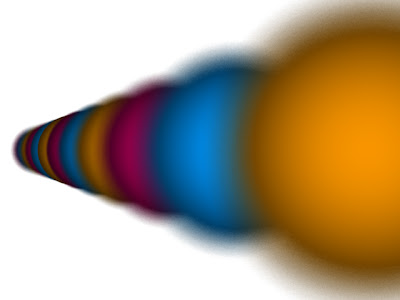
As in real life photography, a longer lens creates more depth of field and a shorter lens creates less depth of field. Here, I have experimented with a 35mm, 60mm, 100mm, 150mm, 200mm, 270mm, 320mm, 400mm, 450mm and 600mm lens.
 |
| 35mm lens |
 |
| 60mm lens |
 |
| 100mm lens |
 |
| 150mm lens |
 |
| 200 mm lens |
 |
| 270mm lens |
 |
| 320mm lens |
 |
| 350mm lens |
 |
| 400mm lens |
 |
| 450mm lens |
A thing to keep in mind, when using any kind of blur, is that we need to increase pixel samples. The two images below show a comparison with default pixel samples and 8 samples.
 |
| Pixel samples need to be increased when adding blur |
Simply put, ceteris paribus, a small f-stop will produce a lot of blurring and a large f-stop will less blurring. In the renders below we can notice this phenomenon. For both the renders a focal distance of 4m was used on a 350mm lens.
 |
| f-stop of 8 produces less blurring |
 |
| f-stop of 2.8 produces more blurring |
Monday, June 25, 2012
Day 25
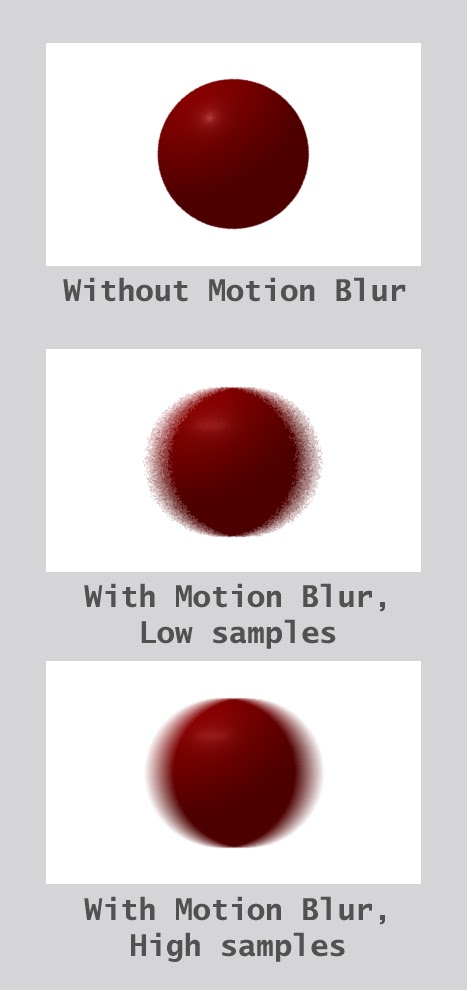
Back in business now. I started off with reading about the motion blur and then did some tests. To be able to visualise how it looks, I animated a sphere travelling across the screen, using .rib files. I then added motion blur to these spheres using the motion blocks, MotionBegin and MotionEnd. The first test was at low pixel samples. I then increased the pixel samples to 8 8 to get a higher quality blur. The difference can be seen in the picture below:
You can have a look at it in action:
You can have a look at it in action:
After the simple blur, I added a slightly more complicated motion path, where I specified 3 points in the motion block for renderMan to calculate the blur. Here I added favouring where I could control the amount of blur following the object and ahead of the object.
 |
| Default blur with no favouring |
 |
| Blur favouring the right hand side |
 |
| Blur favouring the left hand side |
Well, thats it for today for renderMan. Will start with depth of field tomorrow morning.
Day 22, 23 and 24
Was on a mini-vacation for the last 3 days. Went off to somewhere where there was no internet and mostly no electricity. Was able to read up a bit though. Also tried setting up depth-map shadows, it didn't work. Most probably because Ian's code is meant to work with PRMan only and I am using 3Delight. Have asked for the solution on the forum, lets see what happens.
Subscribe to:
Posts (Atom)